Pixels, Image Resolution, and Print Sizes
The quality of a digital picture is largely dependent upon the number and size of the digital camera pixels contained in the image. The image resolution is simply the information about the pixel density of the image. Higher resolution images can be printed to larger sizes with less loss of image quality than low resolution images. Also,because they contain more digital information, high resolution images can be cropped if necessary, and still retain enough digital information to produce a decent print. (depending upon the amount of cropping)
For reference purposes, there is a photo enlargement chart further down on this page that will give you an idea of the best image resolution needed for various photo print sizes. It can be helpful if you are thinking about ordering enlarged prints or canvas prints of your pictures from an online printer like Shutterfly.com
Still, it is probably a good idea to first read the following information on pixels, image file sizes, and image resolution. That way, you will have a better understanding as to why certain images should only be enlarged to certain print sizes.
What are Pixels? The word Pixel is a shortened and combined version of the words Picture and Element. (Pic-El) Every digital camera contains a device called the image sensor which has millions of light capturing cells. The light captured at each cell location is called a digital camera pixel. For the record, there are one million pixels in a megapixel.
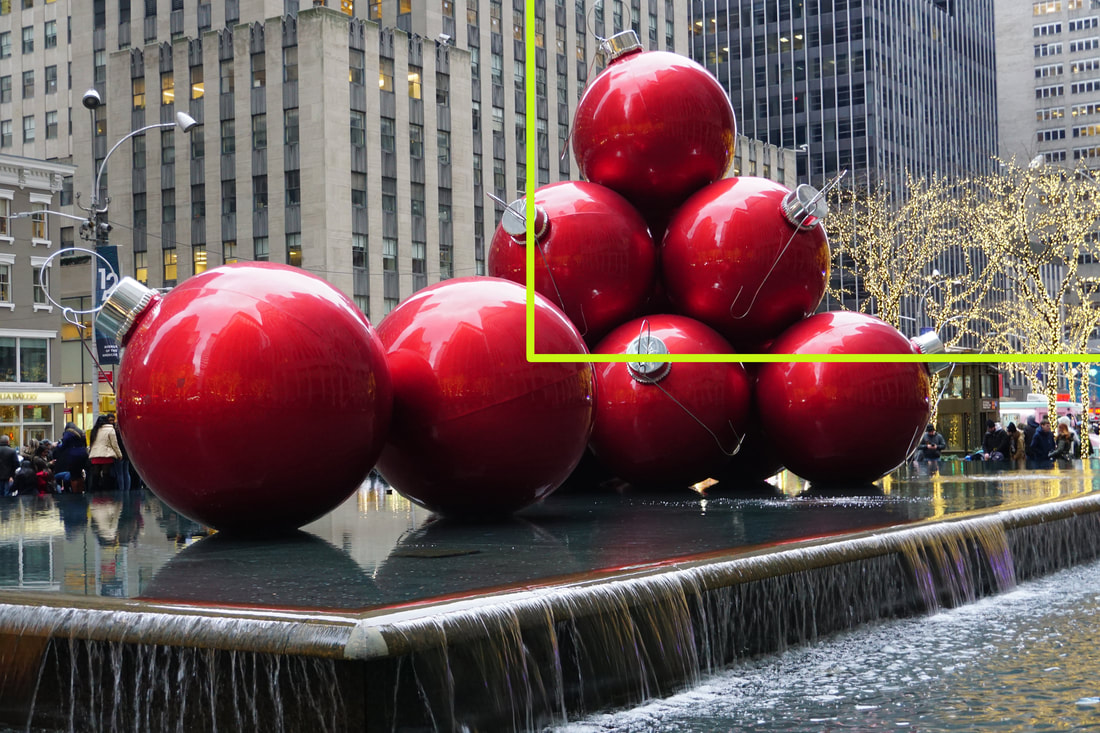
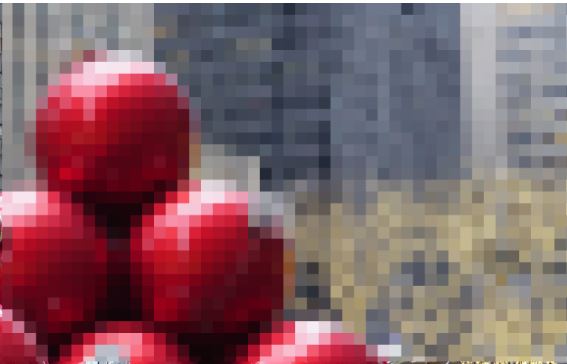
Picture 1B shows a portion of picture 1A with the pixels greatly magnified and exaggerated so that you can see how pixels form an image. However, there will be thousands or millions more pixels in an area equivalent to picture #1B when you take your pictures.
For reference purposes, there is a photo enlargement chart further down on this page that will give you an idea of the best image resolution needed for various photo print sizes. It can be helpful if you are thinking about ordering enlarged prints or canvas prints of your pictures from an online printer like Shutterfly.com
Still, it is probably a good idea to first read the following information on pixels, image file sizes, and image resolution. That way, you will have a better understanding as to why certain images should only be enlarged to certain print sizes.
What are Pixels? The word Pixel is a shortened and combined version of the words Picture and Element. (Pic-El) Every digital camera contains a device called the image sensor which has millions of light capturing cells. The light captured at each cell location is called a digital camera pixel. For the record, there are one million pixels in a megapixel.
Picture 1B shows a portion of picture 1A with the pixels greatly magnified and exaggerated so that you can see how pixels form an image. However, there will be thousands or millions more pixels in an area equivalent to picture #1B when you take your pictures.
Picture 1A
|
Picture 1B, Example of Pixels
|
The only difference between the highlighted area in picture 1A and whole area of picture 1B is that the individual pixels cannot be seen in picture 1A. The colors and light intensity for each of the millions of pixels in digital images appear smoothly blended together when we view them as a printed picture or on a computer screen.
Digital SLR cameras like the Nikon D3500 have larger image sensors than those found in compact digital cameras like the Canon Powershot ELPH 190 IS. The image sensors found in cell phone cameras are smaller than those found in compact cameras.
The larger sensors found in Digital SLR cameras produce larger pixels which absorb more light and and records more information about the light, which leads to higher quality images. However, the image sensors found in cameras with smaller sensors can with produce great images that are more than acceptable for the average photographer.
Looking for Digital SLR quality images in a smaller more compact camera? Take a look at the Sony A6100!!!
Looking for Digital SLR quality images in a smaller more compact camera? Take a look at the Sony A6100!!!
Image File Size: The file size of an image is expressed by the total number of pixels in the width and height of an image. For instance a file size might be written as 3,456 X 2,304. That means there are 3,456 total pixels in the combined rows of pixels in the image from left to right, and 2,304 total pixels in the combined columns of pixels from top to bottom.
To find the total number of pixels in an image, just multiply the number of pixels in the width of the image by the number of pixels in the height of the image. (3,456 X 2,304=7,962,624 ) Usually the total amount of pixels is rounded up or down to the nearest megapixel. So in this case the image might be called an 8 Megapixel picture although it does not contain a full 8 million pixels.
Although digital cameras are often marketed with emphasis on the total number of megapixels available for an image, they all have settings which allow the photographer to take pictures with smaller file sizes. That feature can save space on your cameras memory or in your computer hard drive.
Images with smaller file sizes are easier to send and download when using email or social media. Taking pictures at different file sizes will make more sense as you continue to read about image resolution and print sizes.
If the pictures you have already taken are large files, many photo editing programs have functions which allow you to reduce the size of an image file. Adobe Photoshop Elements is the best known photo editing software from which you can change file sizes as well as enhance and/or fix your images.
Image Resolution: In general terms, image resolution refers to the amount of digital information contained in an image file. A picture file size of 4,000 x 3,000 pixels will have a higher image resolution than a file size of 2,000 x 1,500 pixels. Higher resolution pictures will be sharper, clearer, and colors will be more accurately reproduced when viewed as a print.
Image resolution may also be referred to as pixel density in terms of Pixels Per Inch (PPI) rather than the size of the whole image file. PPI is the number of pixels contained in one square inch of an image file. Computer screens are able to show clear and sharp images at low screen resolutions such as 72 PPI or 96 PPI.
If you will be taking pictures that are intended for on screen viewing only, you can set your camera to a low resolution setting like 4 or 6 megapixels. The images will look fine on a computer screen. Taking your pictures at a higher quality setting like 14 megapixels will not make the image look better on a 72 PPI computer screen.
On the other hand, it is absolutely necessary to set your camera to one of its highest quality settings if you are going to make enlarged prints of your images on photo paper. A picture taken at a 2 megapixel setting will make a very poor quality 11 X 14 size printed picture. If you have a 14 megapixel camera and there is a possibility that you will be making enlarged prints from your images, use the higher 14 megapixel setting to ensure that you will get the best quality prints.
If you'd like to print your own pictures from home, the HP ENVY 5055 all in one printer will produce very good high resolution prints up to size 8 X 10. If you don't want to make your own prints or if you need high quality prints up to 20 X 30 size, you can order them online from Shutterfly.
When it comes to making prints from your images, you will often see the term DPI (Dots Per Inch) used rather than PPI. DPI refers to the number of dots of ink per inch used by a printing device to produce a picture on photo paper.
Why leave your best family and vacation photos just sitting in your computer or phone? Beautifully display them in a Photo Book from Shutterfly!
Calculating Maximum print sizes: As previously mentioned, to view pictures clearly on a computer monitor, the screen only needs an output resolution of 72 PPI or 96 PPI. However, in order for a printed image to be sharp and clear, the output resolution from the printer needs to be much higher. A printer output resolution from 200 DPI to 300 DPI is a good range for making prints from your image files. (that is with 300 DPI being professional grade printing)
Image File Size: The file size of an image is expressed by the total number of pixels in the width and height of an image. For instance a file size might be written as 3,456 X 2,304. That means there are 3,456 total pixels in the combined rows of pixels in the image from left to right, and 2,304 total pixels in the combined columns of pixels from top to bottom.
To find the total number of pixels in an image, just multiply the number of pixels in the width of the image by the number of pixels in the height of the image. (3,456 X 2,304=7,962,624 ) Usually the total amount of pixels is rounded up or down to the nearest megapixel. So in this case the image might be called an 8 Megapixel picture although it does not contain a full 8 million pixels.
Although digital cameras are often marketed with emphasis on the total number of megapixels available for an image, they all have settings which allow the photographer to take pictures with smaller file sizes. That feature can save space on your cameras memory or in your computer hard drive.
Images with smaller file sizes are easier to send and download when using email or social media. Taking pictures at different file sizes will make more sense as you continue to read about image resolution and print sizes.
If the pictures you have already taken are large files, many photo editing programs have functions which allow you to reduce the size of an image file. Adobe Photoshop Elements is the best known photo editing software from which you can change file sizes as well as enhance and/or fix your images.
Image Resolution: In general terms, image resolution refers to the amount of digital information contained in an image file. A picture file size of 4,000 x 3,000 pixels will have a higher image resolution than a file size of 2,000 x 1,500 pixels. Higher resolution pictures will be sharper, clearer, and colors will be more accurately reproduced when viewed as a print.
Image resolution may also be referred to as pixel density in terms of Pixels Per Inch (PPI) rather than the size of the whole image file. PPI is the number of pixels contained in one square inch of an image file. Computer screens are able to show clear and sharp images at low screen resolutions such as 72 PPI or 96 PPI.
If you will be taking pictures that are intended for on screen viewing only, you can set your camera to a low resolution setting like 4 or 6 megapixels. The images will look fine on a computer screen. Taking your pictures at a higher quality setting like 14 megapixels will not make the image look better on a 72 PPI computer screen.
On the other hand, it is absolutely necessary to set your camera to one of its highest quality settings if you are going to make enlarged prints of your images on photo paper. A picture taken at a 2 megapixel setting will make a very poor quality 11 X 14 size printed picture. If you have a 14 megapixel camera and there is a possibility that you will be making enlarged prints from your images, use the higher 14 megapixel setting to ensure that you will get the best quality prints.
If you'd like to print your own pictures from home, the HP ENVY 5055 all in one printer will produce very good high resolution prints up to size 8 X 10. If you don't want to make your own prints or if you need high quality prints up to 20 X 30 size, you can order them online from Shutterfly.
When it comes to making prints from your images, you will often see the term DPI (Dots Per Inch) used rather than PPI. DPI refers to the number of dots of ink per inch used by a printing device to produce a picture on photo paper.
Why leave your best family and vacation photos just sitting in your computer or phone? Beautifully display them in a Photo Book from Shutterfly!
Calculating Maximum print sizes: As previously mentioned, to view pictures clearly on a computer monitor, the screen only needs an output resolution of 72 PPI or 96 PPI. However, in order for a printed image to be sharp and clear, the output resolution from the printer needs to be much higher. A printer output resolution from 200 DPI to 300 DPI is a good range for making prints from your image files. (that is with 300 DPI being professional grade printing)
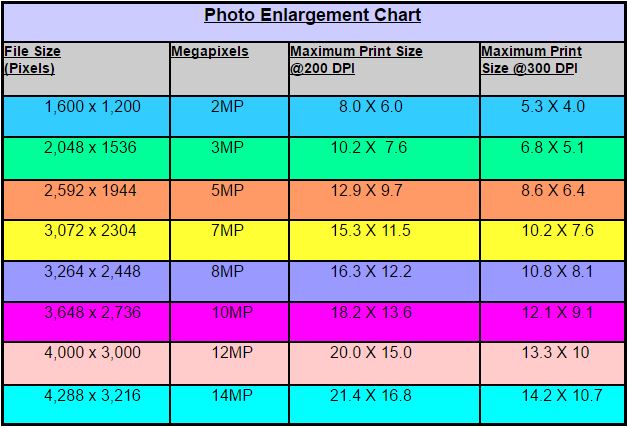
The photo enlargement chart shown above gives the approximate maximum print sizes (in inches) to which you may enlarge your pictures and retain good quality. Take note that the maximum print sizes listed are just guidelines and prints can be enlarged to sizes slightly larger than those listed.
However, a keep in mind that a 3MP image that is enlarged to 20 x 15.0 size will be a very poor quality print. It might even be pixelated like picture 1B at the top of this article. Making prints smaller than the recommended maximum for the file size listed is not a problem. The prints will still be very high quality.
The photo enlargement chart shows exact print sizes in inches. However, in reality those sizes are usually rounded off to match the standard printing paper sizes available. Some of the more common print sizes are 4X6, 5X7, 8X10, 10X13, 11X14, and 16X20.
It is actually pretty easy to determine the maximum print size you can make from your digital images. First you need to determine how many DPI (dots per inch) will be used when the file is being printed. To keep it simple, lets say the printer output resolution will be 200 DPI. If your image file size is 2,000 X 1,600 you will be able to get a quality print size up to about 10 X 8.
The math involved in coming up with that size print is to first divide the number of pixels in the width of the file by the 200 DPI. (2,000/200=10). Next,divide the number of pixels in the height of the file by 200. (1600/200=8). So there you have it. A file size of 2,000 pixels X 1600 pixels can be printed to make a good quality 10 X 8 photo when printed at 200 DPI.
If you decide to make a print at 300DPI from the same image file, you will have a print with better resolution. However the maximum size for a quality print will be smaller. Lets do the math.... 2,000/300=6.6. Next, 1,600/300=5.3. So if you round the numbers out, the maximum standard size for that print will be about 7 X 5.
Of course you won't have to do this type calculation every time you take a picture. Just keep in mind that when you are planning to take pictures that will be printed and enlarged, use one of your cameras' largest file size setting.
Poster Size and Larger Prints: The above photo enlargement chart above refers to images that are going to be viewed at a close distance. For example, prints in a photo album are usually viewed with the picture only a foot or 2 away from your eyes. At that distance it is easy to notice if a picture is out of focus or very sharp.
However, poster size pictures or larger prints that will be hung on a wall do not necessarily have to be razor sharp to be acceptable for viewing. That is because they will usually be viewed from a greater distance (4-5 feet or more) so soft focus and slight imperfections in the images may not be noticeable. When it comes to very large prints, the photo developing lab has various techniques (including printing at a lower DPI) that can produce acceptable large prints that may not fit into the parameters of the photo enlargement chart above.
However, a keep in mind that a 3MP image that is enlarged to 20 x 15.0 size will be a very poor quality print. It might even be pixelated like picture 1B at the top of this article. Making prints smaller than the recommended maximum for the file size listed is not a problem. The prints will still be very high quality.
The photo enlargement chart shows exact print sizes in inches. However, in reality those sizes are usually rounded off to match the standard printing paper sizes available. Some of the more common print sizes are 4X6, 5X7, 8X10, 10X13, 11X14, and 16X20.
It is actually pretty easy to determine the maximum print size you can make from your digital images. First you need to determine how many DPI (dots per inch) will be used when the file is being printed. To keep it simple, lets say the printer output resolution will be 200 DPI. If your image file size is 2,000 X 1,600 you will be able to get a quality print size up to about 10 X 8.
The math involved in coming up with that size print is to first divide the number of pixels in the width of the file by the 200 DPI. (2,000/200=10). Next,divide the number of pixels in the height of the file by 200. (1600/200=8). So there you have it. A file size of 2,000 pixels X 1600 pixels can be printed to make a good quality 10 X 8 photo when printed at 200 DPI.
If you decide to make a print at 300DPI from the same image file, you will have a print with better resolution. However the maximum size for a quality print will be smaller. Lets do the math.... 2,000/300=6.6. Next, 1,600/300=5.3. So if you round the numbers out, the maximum standard size for that print will be about 7 X 5.
Of course you won't have to do this type calculation every time you take a picture. Just keep in mind that when you are planning to take pictures that will be printed and enlarged, use one of your cameras' largest file size setting.
Poster Size and Larger Prints: The above photo enlargement chart above refers to images that are going to be viewed at a close distance. For example, prints in a photo album are usually viewed with the picture only a foot or 2 away from your eyes. At that distance it is easy to notice if a picture is out of focus or very sharp.
However, poster size pictures or larger prints that will be hung on a wall do not necessarily have to be razor sharp to be acceptable for viewing. That is because they will usually be viewed from a greater distance (4-5 feet or more) so soft focus and slight imperfections in the images may not be noticeable. When it comes to very large prints, the photo developing lab has various techniques (including printing at a lower DPI) that can produce acceptable large prints that may not fit into the parameters of the photo enlargement chart above.